
Regain 3 Weeks of Lost Learning In Every Classroom
Studybugs Registers is a groundbreaking system for taking the register in primary schools. Children tap themselves in, choose their lunch and get on with learning. It’s as simple as that. Schools using it are gaining 3 weeks* of teaching time every year, in every classroom.
* Average figure determined by timing registration sessions before and after introducing Studybugs Registers. Similar figures were observed regardless of whether schools were previously taking paper or electronic registers.
It’s So Simple a 4-Year-Old Can Use It
In fact, thousands of 4-year-olds use it every day.
“Children and staff think it’s absolutely fabulous!”

“The children quickly got the hang of signing themselves in… within 5 minutes of walking through the classroom door they have put their belongings away, registered and are ready to begin learning.”

“I’m finding I’m getting nearly another full half an hour of teaching done first thing.”

See How Much Time You Could Gain
Based on timings taken at other schools. Edit highlighted fields to see your projections.
Methodology
- We sat in and timed actual registration sessions, over a period of one week, before introducing Studybugs Registers.
- Schools then introduced Studybugs Registers.
- We waited a week, to be sure teachers and children were fully up to speed with the new system.
- We timed registration sessions again, in the same classes, over another week. Projections are based on average figures across all classes.
“Thank you again for our two extra weeks of learning every year!”

Kickstart Each Day With an Engaging Learning Opportunity
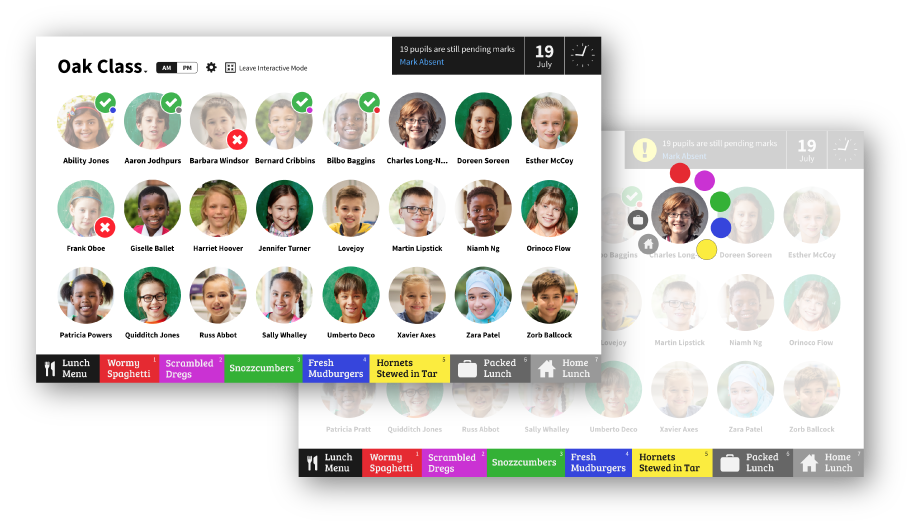
Studybugs Registers provides an interactive learning opportunity that supports children’s cognitive needs – promoting independence, decision making and curriculum skills like identifying their name, recognising their peers and telling the time.
Pupil Pictures
Automatically uploaded from your MIS, or uploaded directly to Studybugs if you prefer.
Mixing It Up
Sort by first name, surname or randomise daily to keep everyone on their toes.
Easy Access
Controls at the bottom enable all children to reach their pictures.
Smart Layout
However many in your class, no pupil is ever shown in a row on their own.

Make Taking Lunch Choices Deliciously Easy
Take Lunch Choices
Children can see today’s colour-coded menu and make their selections with a single tap.
Flexible Lunch Menus
Configure menus per day, per class or year group, with multiple courses or meal options.
Daily Lunch Choice Report
School office and kitchen are automatically emailed with children’s lunch choices as soon as registration is finished.
Payments Integration
Lunch choices are automatically entered into popular payment systems.

Convenient Overview for Teachers
Registers is designed to be supervised by teachers. We provide a simple interactive mode for children to use, while teachers get additional information to make their lives easier.
Access Anywhere
On-site or off, on interactive whiteboards, computers, tablets, smartphones. All you need is a web browser.
Changes Posted Automatically
No worries about teachers forgetting to hit ‘save’ – all changes are posted automatically. It also updates live, so teachers can see immediately when the school office posts a child late or absent.
Built-in Cross-Checking
Teachers see the final tally, quickly cross-check and mark any absent pupils with a single click.
Synchronised With Your MIS
Automatic, immediate two-way synchronisation with SIMS, Arbor, Bromcom and more. Plus, Registers works even if your MIS is down, synchronising automatically when it’s back up.
Keyboard Shortcuts
If you need to take the register the old-fashioned way, keyboard shortcuts make it super-quick.

Admin Tools Keep You in Control
Control Who Can Do What
Restrict teacher access so they can only post present or absent, or give them full control over marks posted – it’s up to you.
Overwrite Protection
Prevents children or teachers accidentally overwriting register marks posted by others.
Access For Staff Who Need It
Give access to specific class registers to cover teachers or other staff who share responsibilities.
Audit Log
See complete history of register mark edits, with who made each change and when.